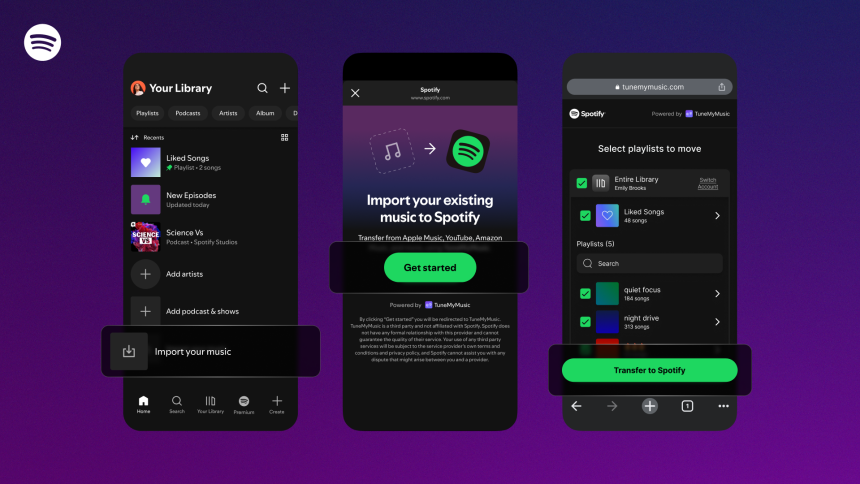
Spotify is making it easier for users to make the switch from other streaming services.
The new feature, which is rolling out now to all Spotify users, will be found in the “Your Library” section of the Spotify mobile app.
Here’s how to Transfer Playlists:
1. Open the Spotify Mobile App
- Launch Spotify on your mobile device (iOS or Android)
- Go to “Your Library” (the tab at the bottom).
2. Find the “Import Your Music” Option
- Scroll to the very bottom of the “Your Library” screen.
- Tap on “Import your music”.
3. Connect to TuneMyMusic
- After tapping “Import your music,” you’ll be guided through prompts to connect to TuneMyMusic, a third-party service.
- If you don’t already have a TuneMyMusic account, you may need to create one, or authorize via Spotify.
4. Choose Your Source Music Service
- Once connected, you can select which streaming platform you want to transfer playlists from. Options include:
- Amazon Music
- Apple Music
- Deezer
- Pandora
- SoundCloud
- Tidal
- YouTube Music
- …and others supported by TuneMyMusic.
5. Select the Playlists to Transfer
- After picking the source service, browse your playlists on that service (within the TuneMyMusic interface).
- Choose the playlists you want to copy over to Spotify.
6. Confirm and Start the Transfer
- Once your playlists are selected, confirm the transfer.
- TuneMyMusic will copy those playlists into your Spotify library. Important: this process does not delete the original playlists on the source service; it only copies them to Spotify.
7. Review Transferred Playlists
- Go back to your Spotify “Your Library” → Playlists to check that the playlists have appeared.
- Because it’s a “copy,” your original playlists remain intact on the other service.
8. Optional: Upgrade for More Features
- Note: the free version of TuneMyMusic only allows up to 500 tracks to be transferred.
- If you want to move more than 500 tracks, you’ll likely need to upgrade to TuneMyMusic’s paid plan.