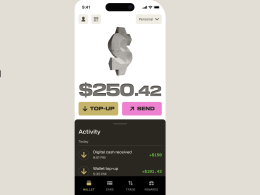




A Steam gift card provides a code that adds prepaid value to a Steam Wallet after redemption. Crypto shopping apps can make that value accessible without first cashing out to a bank account, but they cannot override Steam’s compatibility or account rules.
Buyers still need to select the correct card, review its denomination and protect the delivered code. Bitsika and CoinsBee are two verified mobile options that support crypto-funded Steam gift-card purchases.
Our pick: Bitsika for a reusable crypto-funded balance
Bitsika is our first choice for someone who wants to fund one mobile account and use it across Steam and other gaming products. Its app clearly distinguishes gift-card codes from direct game top-ups.
1. Bitsika: Deposit crypto, then choose a Steam voucher
The Bitsika app is available on Android and iPhone. Users can buy Steam gift cards with crypto through Bitsika by depositing crypto, including USDT and Bitcoin, into their Bitsika balance.
Once the deposit is credited, open the Steam listing, inspect the currently available voucher, denomination and currency, and confirm payment from that balance. The result is a redeemable digital code rather than an automatic transfer to a Steam account.
An account and the verification displayed by Bitsika are required. When funding, match both the asset and blockchain network; USDT sent over the wrong network may not reach the intended balance. Compare the balance cost and any network fee before sending. After purchase, keep the code private and retain the order reference until Steam accepts it.
2. CoinsBee: App checkout with a broad crypto selection
CoinsBee provides an Android and iOS app for buying and managing gift cards. Its Steam gift-card catalogue supports Bitcoin, USDT and other listed crypto assets, with digital delivery by email after the payment is confirmed. Buyers select a region and amount before checkout, making the compatibility decision part of the shopping flow rather than an afterthought.
This app suits someone who prefers to pay for an individual card instead of first maintaining a general platform balance. CoinsBee also supports customer accounts for order and code management, although the exact payment options and card inventory can vary by region. Review the selected region, recipient email and crypto invoice before paying, and do not send funds after an invoice has expired.
How to choose between the two apps
Bitsika fits buyers who value a reusable balance and a gaming-focused catalogue. CoinsBee fits buyers who want a checkout-led purchase and a wider set of crypto choices. Neither app changes what Steam Wallet credit can do: Steam says wallet codes add prepaid value for eligible games, software and other Steam purchases.
Check the live card description and Steam’s official wallet-code redemption page before ordering.
Whichever app you choose, confirm the card details, crypto network, final amount and delivery channel before payment. Redeem while signed in to the intended Steam account, and never share a code with anyone requesting gift cards for taxes, bills or technical support. If delivery is delayed, use the transaction hash and order receipt with official support rather than sending a second payment.